Eliza - A computer programmed robot that answered questions with questions. It had 240 lines of code.
Unimate Robot - The first industrial robot built in 1961. It took die casting from machines and performed weilding similar to a human task.
Wednesday, July 21, 2010

What Is A Robot?
A robot is a machine that can be programmed or controlled to do a specific task such as walking or flying. This is usually powered by electricity and can resemble human tasks.
Thursday, June 3, 2010
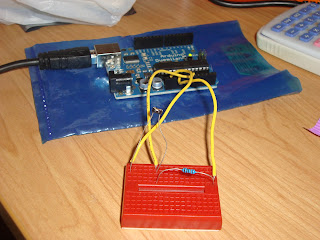
Task 59 - Data Logging of Light Over 24 Hours
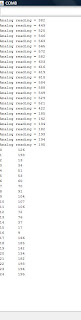
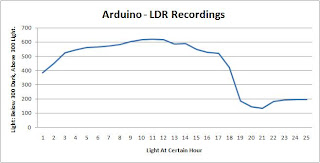
I found this was not very accurate as EEPROM was not storing numbers correctly. If a number was over 300 it would not save it into EEPROM, but would save another number all together. However These are my results
#include
int photocellPin = 0; // the cell and 10K pulldown are connected to a0
int photocellReading; // the analog reading from the analog resistor divider
int value;
int a = 0;
void setup() {
Serial.begin(9600);
for (int i=0; i <25; i++){
photocellReading = analogRead(photocellPin);
Serial.print("Analog reading = ");
Serial.println(photocellReading);
EEPROM.write(i, photocellReading);
delay(3600000);
value = EEPROM.read(i);
Serial.print(i);
Serial.print("\t");
Serial.print(value);
Serial.println();
}
for (int i=0; i <25; i++){
value = EEPROM.read(i);
Serial.print(i);
Serial.print("\t");
Serial.print(value);
Serial.println();
}
}
void loop(){
}
Graphed Results (Analog Results, not ones stored in EEPROM):


#include
int photocellPin = 0; // the cell and 10K pulldown are connected to a0
int photocellReading; // the analog reading from the analog resistor divider
int value;
int a = 0;
void setup() {
Serial.begin(9600);
for (int i=0; i <25; i++){
photocellReading = analogRead(photocellPin);
Serial.print("Analog reading = ");
Serial.println(photocellReading);
EEPROM.write(i, photocellReading);
delay(3600000);
value = EEPROM.read(i);
Serial.print(i);
Serial.print("\t");
Serial.print(value);
Serial.println();
}
for (int i=0; i <25; i++){
value = EEPROM.read(i);
Serial.print(i);
Serial.print("\t");
Serial.print(value);
Serial.println();
}
}
void loop(){
}
Graphed Results (Analog Results, not ones stored in EEPROM):

Major Project - Pong Through One Matrix Display
/*This is a Pong game used on one Matrix display using analog
potentionmeters to move the paddles. This game was helped using
similar code from Tom Igoe (for pong) and scrolling message from
the website http://www.tinyurl.com/yhwxv6h*/
// define the edges of the screen:
#define LEFT 0
#define RIGHT 7
#define TOP 0
#define BOTTOM 7
int speed = 15; //number of times to repeat each frame
int pauseDelay = 500; //microseconds to leave each row on before moving to the next
int index = 0; //this is the current charachter in the string being displayed
int offset = 0; //this is how many columns it is offset by
const int A = 0; const int B = 1; const int C = 2; const int D = 3; const int E = 4;
const int F = 5; const int G = 6; const int H = 7; const int I = 8; const int J = 9;
const int K = 10; const int L =11; const int M = 12; const int N = 13; const int O = 14;
const int P = 15; const int Q =16; const int R = 17; const int S = 18; const int T = 19;
const int U = 20; const int V =21; const int W = 22; const int X = 23; const int Y = 24;
const int Z = 25; // Letters to be displayed
char requestString1[] = " Left Player Wins "; // Request String for left player
char requestString2[] = " Right Player Wins "; // Request String for right player
int matrixCount = 0;
int rowA[] ={11,14,16,3,13,5,7,9}; //5,6,7,8,9,10,11,12 of matrix
//An Array defining which pin each row is attached to
int colA[] = {8,6,4,2,17,15,12,10}; //24,23,22,21,4,3,2,1 of matrix
//An Array defining which pin each col is attached to
//Punctuation
const int COL =26; const int DASH = 27; const int BRA2 = 28; const int _ = 29; const int LINE = 34;
const int DOT =36;
//Extra Charchters
const int FULL =30; const int CHECK = 31; const int A3 = 32; const int TEMP = 33;
const int SMILE =35; const int COLDOT = 36;
//The array used to hold a bitmap of the display
//(if you wish to do something other than scrolling marque change the data in this
//variable then display)
byte data[] = {0,0,0,0,0,0,0,0};
//The alphabet
//Each Charachter is an 8 x 7 bitmap where 1 is on and 0 if off
const int _A[] = {B0001000,
B0010100,
B0100010,
B1000001,
B1111111,
B1000001,
B1000001,
B0000000};
const int _B[] = {B1111110,
B0100001,
B0100001,
B0111110,
B0100001,
B0100001,
B1111110,
B0000000};
const int _C[] = {B0011111,
B0100000,
B1000000,
B1000000,
B1000000,
B0100000,
B0011111,
B0000000};
const int _D[] = {B1111100,
B0100010,
B0100001,
B0100001,
B0100001,
B0100010,
B1111100,
B0000000};
const int _E[] = {B1111111,
B1000000,
B1000000,
B1111100,
B1000000,
B1000000,
B1111111,
B0000000};
const int _F[] = {B1111111,
B1000000,
B1000000,
B1111100,
B1000000,
B1000000,
B1000000,
B0000000};
const int _G[] = {B0011111,
B0100000,
B1000000,
B1001111,
B1000001,
B0100001,
B0011111,
B0000000};
const int _H[] = {B1000001,
B1000001,
B1000001,
B1111111,
B1000001,
B1000001,
B1000001,
B0000000};
const int _I[] = {B1111111,
B0001000,
B0001000,
B0001000,
B0001000,
B0001000,
B1111111,
B0000000};
const int _J[] = {B0001111,
B0000001,
B0000001,
B0000001,
B0000001,
B1000001,
B0111110,
B0000000};
const int _K[] = {B1000011,
B1000100,
B1001000,
B1110000,
B1001000,
B1000100,
B1000011,
B0000000};
const int _L[] = {B1000000,
B1000000,
B1000000,
B1000000,
B1000000,
B1000000,
B1111111,
B0000000};
const int _M[] = {B1110110,
B1001001,
B1001001,
B1001001,
B1001001,
B1001001,
B1001001,
B0000000};
const int _N[] = {B1000001,
B1100001,
B1010001,
B1001001,
B1000101,
B1000011,
B1000001,
B0000000};
const int _O[] = {B0011100,
B0100010,
B1000001,
B1001001,
B1000001,
B0100010,
B0011100,
B0000000};
const int _P[] = {B1111110,
B0100001,
B0100001,
B0111110,
B0100000,
B0100000,
B0100000,
B0000000};
const int _Q[] = {B0011100,
B0100010,
B1000001,
B1000001,
B1000101,
B0100010,
B0011101,
B0000000};
const int _R[] = {B1111110,
B0100001,
B0100001,
B0101110,
B0100100,
B0100010,
B0100001,
B0000000};
const int _S[] = {B0111111,
B1000000,
B1000000,
B0111110,
B0000001,
B0000001,
B1111110,
B0000000};
const int _T[] = {B1111111,
B0001000,
B0001000,
B0001000,
B0001000,
B0001000,
B0001000,
B0000000};
const int _U[] = {B1000001,
B1000001,
B1000001,
B1000001,
B1000001,
B1000001,
B0111110,
B0000000};
const int _V[] = {B1000001,
B1000001,
B1000001,
B1000001,
B0100010,
B0010100,
B0001000,
B0000000};
const int _W[] = {B1000001,
B1001001,
B1001001,
B1001001,
B1001001,
B1001001,
B0110110,
B0000000};
const int _X[] = {B1000001,
B0100010,
B0010100,
B0001000,
B0010100,
B0100010,
B1000001,
B0000000};
const int _Y[] = {B1000001,
B0100010,
B0010100,
B0001000,
B0001000,
B0001000,
B0001000,
B0000000};
const int _Z[] = {B1111111,
B0000010,
B0000100,
B0111110,
B0010000,
B0100000,
B1111111,
B0000000};
const int _COL[] = {B0000000,
B0011000,
B0011000,
B0000000,
B0011000,
B0011000,
B0000000,
B0000000};
const int _DASH[] = {B0000000,
B0000000,
B0000000,
B0111110,
B0000000,
B0000000,
B0000000,
B0000000};
const int _BRA2[] = {B0010000,
B0001000,
B0000100,
B0000100,
B0001000,
B0010000,
B0000000,
B0000000};
const int __[] = {B0000000,
B0000000,
B0000000,
B0000000,
B0000000,
B0000000,
B0000000,
B0000000};
const int _FULL[] = {B1111111,
B1111111,
B1111111,
B1111111,
B1111111,
B1111111,
B1111111,
B1111111};
const int _CHECK[] = {B1010101,
B0101010,
B1010101,
B0101010,
B1010101,
B0101010,
B1010101,
B0000000};
const int _A3[] = {B0111110,
B0000001,
B0000001,
B0001111,
B0000001,
B1000001,
B0111110,
B0000000};
const int _TEMP[] = {B0000011,
B0011111,
B0111111,
B1111110,
B1111111,
B0011111,
B0000011,
B0000000};
const int _LINE[] = {B0000001,
B0000001,
B0000001,
B0000001,
B0000001,
B0000001,
B0000001,
B0000000};
const int _SMILE[] = {B1100110,
B1100110,
B0000000,
B0011100,
B1000001,
B0100010,
B0011100,
B0000000};
const int _DOT[] = {B0000000,
B0000000,
B0000000,
B0000000,
B1100000,
B1100000,
B0000000,
B0000000};
const int _COLDOT[] = {B0000000,
B0110000,
B0110000,
B0000000,
B0110011,
B0110011,
B0000000,
B0000000};
//Load the bitmap charachters into an array (each charachters position corresponds to its previously defined index (ie _A (a's bitmap)
//is at index 0 and A = 0 so letters[A] will return the 'A' bitmap)
const int* letters[] = {_A,_B,_C,_D,_E,_F,_G,_H,_I,_J,_K,_L,_M,_N,_O,_P,_Q,_R,_S,_T,_U,_V,_W,_X,_Y,_Z,_COL,_DASH,_BRA2,__, _FULL, _CHECK, _A3, _TEMP, _LINE, _SMILE, _DOT, _COLDOT};
//Setup runs once when power is applied
int pixels[8][8]; // 2-dimensional array of pixels
// 2-dimensional array of row pin numbers (for two matrices):
int row[1][8] = {11,14,16,3,13,5,7,9}; //5,6,7,8,9,10,11,12 of matrix
// 2-dimensional array of column pin numbers (for two matrices):
int col[1][8] = {8,6,4,2,17,15,12,10}; //24,23,22,21,4,3,2,1 of matrix
int ballX = 3; // X position of the ball
int ballY = 4; // Y position of the ball
int ballDirectionY = 1; // X direction of the ball
int ballDirectionX = 1; // Y direction of the ball
int lCount = 0; // count score for left paddle
int rCount = 0; // count score for right paddle
int rightPaddleY = 0; // X position of the center of the right paddle
int leftPaddleY = 0; // Y position of the center of the right paddle
long timeStamp = 0; // time stamp to control the pauses between ball moves
long interval = 250; // interval between ball moves, in milliseconds
boolean gamePaused = false; // state of the game
void setup() {
// initialize the I/O pins as outputs:
// iterate over the matrix:
for (int thisMatrix = 0; thisMatrix < 1; thisMatrix++) {
// iterate over the pins:
for (int thisPin = 0; thisPin < 8; thisPin++) {
// initialize the output pins:
pinMode(col[thisMatrix][thisPin], OUTPUT);
pinMode(row[thisMatrix][thisPin], OUTPUT);
// take the col pins (i.e. the cathodes) high to ensure that
// the LEDS are off:
digitalWrite(col[thisMatrix][thisPin], HIGH);
}
}
newGame();
}
void loop() {
// read input:
readSensors();
// move the ball:
if (gamePaused) {
if (millis() - timeStamp > interval*10) {
// if enough time has passed, start the game again:
gamePaused = false;
}
}
// if the game isn't paused, and enough time between ball moves
// has passed, move the ball and update the timestamp:
else {
if (millis() - timeStamp > interval) {
moveBall();
timeStamp = millis();
}
}
// draw the screen:
refreshScreen();
}
void newGame() {
for (int thisMatrix = 0; thisMatrix < 1; thisMatrix++) {
// iterate over the pins:
for (int thisPin = 0; thisPin < 8; thisPin++) {
digitalWrite(row[thisMatrix][thisPin], HIGH);
digitalWrite(col[thisMatrix][thisPin], LOW);
}
delay(200);
for (int thisPin = 0; thisPin < 8; thisPin++) {
digitalWrite(row[thisMatrix][thisPin], LOW);
digitalWrite(col[thisMatrix][thisPin], LOW);
}
delay(100);
}
}
void readSensors() {
// set the left paddle to off:
setPaddle(LEFT, leftPaddleY, HIGH);
// set the right paddle to off:
setPaddle(RIGHT, rightPaddleY, HIGH);
// read the sensors for X and Y values:
leftPaddleY = map(analogRead(4), 0, 1023, 0, 7);
rightPaddleY = map(analogRead(5), 0, 1023, 0, 7);
// set the left paddle to on:
setPaddle(LEFT, leftPaddleY, LOW);
// set the right paddle to on:
setPaddle(RIGHT, rightPaddleY, LOW);
}
void setPaddle(int paddleX, int paddleY, int state) {
// set the last right paddle to on:
pixels[paddleX][paddleY] = state;
// set the bottom pixel of the paddle:
if (paddleY < BOTTOM) {
pixels[paddleX][paddleY+1] = state;
}
// set the top pixel of the paddle:
if (paddleY > TOP) {
pixels[paddleX][paddleY-1] = state;
}
}
void moveBall() {
// check to see if the ball is in the horizontal range
// of the paddles:
// right:
if (ballX >= RIGHT - 1) {
// if the ball's next Y position is between
// the top and bottom of the paddle, reverse its X direction:
if ((ballY + ballDirectionY >= rightPaddleY - 1)
&& (ballY + ballDirectionY <= rightPaddleY +1)) {
// reverse the ball horizontal direction:
ballDirectionX = -ballDirectionX;
}
}
// left:
if (ballX <= LEFT + 1) {
// if the ball's next Y position is between
// the top and bottom of the paddle, reverse its X direction:
if ((ballY + ballDirectionY >= leftPaddleY -1 )
&& (ballY + ballDirectionY <= leftPaddleY +1 )) {
// reverse the ball horizontal direction:
ballDirectionX = -ballDirectionX;
}
}
// if the ball goes off the screen bottom,
// reverse its Y direction:
if (ballY == BOTTOM) {
ballDirectionY = -ballDirectionY;
}
// if the ball goes off the screen top,
// reverse its X direction:
if (ballY == TOP) {
ballDirectionY = -ballDirectionY;
}
// clear the ball's previous position:
pixels[ballX][ballY] = HIGH;
// if the ball goes off the screen left or right:
if ((ballX == LEFT) || (ballX == RIGHT)) {
if (ballX == LEFT) {
lCount = lCount+1;
if (lCount == 3){
matrixCount = 1;
for (int i=0; i<136; i++){
updateMatrix();
}
lCount = 0;
rCount = 0;
newGame();
}
}else if (ballX==RIGHT){
rCount = rCount+1;
if (rCount == 3){
matrixCount = 2;
for (int i=0; i<144; i++){
updateMatrix();
}
lCount = 0;
rCount = 0;
newGame();
}
}
// reset the ball:
ballX = 4;
ballY = 4;
// pause and note the time you paused:
gamePaused = true;
timeStamp = millis();
}
// increment the ball's position in both directions:
ballX = ballX + ballDirectionX;
ballY = ballY + ballDirectionY;
// if the game isn't paused, set the ball
// in its new position:
if (!gamePaused) {
// set the new position:
pixels[ballX][ballY] = LOW;
}
}
void refreshScreen() {
// iterate over the matrices:
for (int thisMatrix = 0; thisMatrix < 1; thisMatrix++) {
// iterate over the rows (anodes):
for (int thisRow = 0; thisRow < 8; thisRow++) {
// take the row pin (anode) high:
digitalWrite(row[thisMatrix][thisRow], HIGH);
// iterate over the cols (cathodes):
for (int thisCol = 0; thisCol < 8; thisCol++) {
// get the state of the current pixel;
int thisPixel = pixels[thisRow+ (thisMatrix * 8)][thisCol];
// when the row is HIGH and the col is LOW,
// the LED where they meet turns on:
digitalWrite(col[thisMatrix][thisCol], thisPixel);
// turn the pixel off:
digitalWrite(col[thisMatrix][thisCol], HIGH);
}
// take the row pin low to turn off the whole row:
digitalWrite(row[thisMatrix][thisRow], LOW);
}
}
}
void updateMatrix(){
loadSprite();
showSprite(speed);
}
const int powers[] = {1,2,4,8,16,32,64,128};
//Loads the current scroll state frame into the data[] display array
void loadSprite(){
if (matrixCount == 1){
int currentChar = getChar(requestString1[index]);
int nextChar = getChar(requestString1[index+1]);
for(int row=0; row < 8; row++){ //iterate through each row
data[row] = 0; //reset the row we're working on
for(int column=0; column < 8; column++){ //iterate through each column
data[row] = data[row] + ((powers[column] & (letters[currentChar][row] << offset))); //loads the current charachter offset by offset pixels
data[row] = data[row] + (powers[column] & (letters[nextChar][row] >> (8-offset) )); //loads the next charachter offset by offset pixels
}
}
offset++; //increment the offset by one row
if(offset==8){offset = 0; index++; if(index==sizeof(requestString1)-2){index=0;}} //if offset is 8 load the next charachter pair for the next time through
}else if (matrixCount == 2){
int currentChar = getChar(requestString2[index]);
int nextChar = getChar(requestString2[index+1]);
for(int row=0; row < 8; row++){ //iterate through each row
data[row] = 0; //reset the row we're working on
for(int column=0; column < 8; column++){ //iterate through each column
data[row] = data[row] + ((powers[column] & (letters[currentChar][row] << offset))); //loads the current charachter offset by offset pixels
data[row] = data[row] + (powers[column] & (letters[nextChar][row] >> (8-offset) )); //loads the next charachter offset by offset pixels
}
}
offset++; //increment the offset by one row
if(offset==8){offset = 0; index++; if(index==sizeof(requestString2)-2){index=0;}} //if offset is 8 load the next charachter pair for the next time through
}
}
void showSprite(int speed2){
for(int iii = 0; iii < speed2; iii++){ //show the current frame speed2 times
for(int column = 0; column < 8; column++){ //iterate through each column
for(int i = 0; i < 8; i++){
digitalWrite(rowA[i], LOW); //turn off all row pins
}
for(int i = 0; i < 8; i++){ //Set only the one pin
if(i == column){ digitalWrite(colA[i], LOW);} //turns the current row on
else{ digitalWrite(colA[i], HIGH); }//turns the rest of the rows off
}
for(int row = 0; row < 8; row++){ //iterate through each pixel in the current column
int bit = (data[column] >> row) & 1;
if(bit == 1){
digitalWrite(rowA[row], HIGH); //if the bit in the data array is set turn the LED on
}
}
delayMicroseconds(pauseDelay); //leave the column on for pauseDelay microseconds (too high a delay causes flicker)
}
}
}
//returns the index of a given charachter
//for converting from a string to a lookup in our array of charachter bitmaps
int getChar(char charachter){
int returnValue = Z;
switch(charachter){
case 'A': returnValue = A; break;
case 'a': returnValue = A; break;
case 'B': returnValue = B; break;
case 'b': returnValue = B; break;
case 'C': returnValue = C; break;
case 'c': returnValue = C; break;
case 'D': returnValue = D; break;
case 'd': returnValue = D; break;
case 'E': returnValue = E; break;
case 'e': returnValue = E; break;
case 'F': returnValue = F; break;
case 'f': returnValue = F; break;
case 'G': returnValue = G; break;
case 'g': returnValue = G; break;
case 'H': returnValue = H; break;
case 'h': returnValue = H; break;
case 'I': returnValue = I; break;
case 'i': returnValue = I; break;
case 'J': returnValue = J; break;
case 'j': returnValue = J; break;
case 'K': returnValue = K; break;
case 'k': returnValue = K; break;
case 'L': returnValue = L; break;
case 'l': returnValue = L; break;
case 'M': returnValue = M; break;
case 'm': returnValue = M; break;
case 'N': returnValue = N; break;
case 'n': returnValue = N; break;
case 'O': returnValue = O; break;
case 'o': returnValue = O; break;
case 'P': returnValue = P; break;
case 'p': returnValue = P; break;
case 'Q': returnValue = Q; break;
case 'q': returnValue = Q; break;
case 'R': returnValue = R; break;
case 'r': returnValue = R; break;
case 'S': returnValue = S; break;
case 's': returnValue = S; break;
case 'T': returnValue = T; break;
case 't': returnValue = T; break;
case 'U': returnValue = U; break;
case 'u': returnValue = U; break;
case 'V': returnValue = V; break;
case 'v': returnValue = V; break;
case 'W': returnValue = W; break;
case 'w': returnValue = W; break;
case 'X': returnValue = X; break;
case 'x': returnValue = X; break;
case 'Y': returnValue = Y; break;
case 'y': returnValue = Y; break;
case 'Z': returnValue = Z; break;
case 'z': returnValue = Z; break;
case ' ': returnValue = _; break;
case '3': returnValue = A3; break;
case '<': returnValue = TEMP; break;
case '*': returnValue = FULL; break;
case '|': returnValue = LINE; break;
case '_': returnValue = _; break;
case ':': returnValue = COL; break;
case '-': returnValue = DASH; break;
case ')': returnValue = BRA2; break;
case '%': returnValue = SMILE; break;
case '.': returnValue = DOT; break;
case '^': returnValue = COLDOT; break;
}
return returnValue;
}
Sunday, May 30, 2010
Task 58 - Finding Average & Biggest Number With Suitable Message
#include EEPROM.h
int photocellPin = 0; // the cell and 10K pulldown are connected to a0
int photocellReading;// the analog reading from the analog resistor divider
int value;
int a = 0;
int smallest = 0;
int biggest = 0;
float average = 0;
void setup() {
Serial.begin(9600);
for (int i=0; i <10; i++){
photocellReading = analogRead(photocellPin);
if (photocellReading < smallest){
smallest = photocellReading;
}
if (photocellReading > biggest){
biggest = photocellReading;
}
average = average + photocellReading;
EEPROM.write(i, photocellReading);
delay(500);
}
for (int i=0; i <10; i++){
value = EEPROM.read(a);
Serial.print(a);
Serial.print("\t");
Serial.print(value);
Serial.println();
a = a + 1;
if (a == 10){
a = 0;
delay(500);
}
}
Serial.println("The Smallest Value Was: " + smallest); // displays smallest value
Serial.println("The Biggest Value Was: " + biggest); // displays biggest value
average = average/10; // calculates mean
Serial.println("The Average/Mean Was: " + average); // displays average value
}
void loop(){
}
int photocellPin = 0; // the cell and 10K pulldown are connected to a0
int photocellReading;// the analog reading from the analog resistor divider
int value;
int a = 0;
int smallest = 0;
int biggest = 0;
float average = 0;
void setup() {
Serial.begin(9600);
for (int i=0; i <10; i++){
photocellReading = analogRead(photocellPin);
if (photocellReading < smallest){
smallest = photocellReading;
}
if (photocellReading > biggest){
biggest = photocellReading;
}
average = average + photocellReading;
EEPROM.write(i, photocellReading);
delay(500);
}
for (int i=0; i <10; i++){
value = EEPROM.read(a);
Serial.print(a);
Serial.print("\t");
Serial.print(value);
Serial.println();
a = a + 1;
if (a == 10){
a = 0;
delay(500);
}
}
Serial.println("The Smallest Value Was: " + smallest); // displays smallest value
Serial.println("The Biggest Value Was: " + biggest); // displays biggest value
average = average/10; // calculates mean
Serial.println("The Average/Mean Was: " + average); // displays average value
}
void loop(){
}
Task 57 - Finding smallest Value With Suitable Message.
#include EEPROM.h
int photocellPin = 0; // the cell and 10K pulldown are connected to a0
int photocellReading;// the analog reading from the analog resistor divider
int value;
int a = 0;
int smallest = 0;
void setup() {
Serial.begin(9600);
for (int i=0; i <10; i++){
photocellReading = analogRead(photocellPin);
if (photocellReading < smallest){
smallest = photocellReading;
}
EEPROM.write(i, photocellReading);
delay(500);
}
for (int i=0; i <10; i++){
value = EEPROM.read(a);
Serial.print(a);
Serial.print("\t");
Serial.print(value);
Serial.println();
a = a + 1;
if (a == 10){
a = 0;
delay(500);
}
}
Serial.println("The Smallest Value Was: " + smallest);
}
void loop(){
}
int photocellPin = 0; // the cell and 10K pulldown are connected to a0
int photocellReading;// the analog reading from the analog resistor divider
int value;
int a = 0;
int smallest = 0;
void setup() {
Serial.begin(9600);
for (int i=0; i <10; i++){
photocellReading = analogRead(photocellPin);
if (photocellReading < smallest){
smallest = photocellReading;
}
EEPROM.write(i, photocellReading);
delay(500);
}
for (int i=0; i <10; i++){
value = EEPROM.read(a);
Serial.print(a);
Serial.print("\t");
Serial.print(value);
Serial.println();
a = a + 1;
if (a == 10){
a = 0;
delay(500);
}
}
Serial.println("The Smallest Value Was: " + smallest);
}
void loop(){
}
Sunday, May 16, 2010
Task 56 - Data Logging to EEPROM
#include EEPROM.h
int photocellPin = 0; // the cell and 10K pulldown are connected to a0
int photocellReading;// the analog reading from the analog resistor divider];
//int mySamples[10];
int value;
int a = 0;
void setup() {
Serial.begin(9600);
for (int i=0; i <10; i++){
photocellReading = analogRead(photocellPin);
//mySamples[i] = (photocellReading);
EEPROM.write(i, photocellReading);
delay(500);
}
for (int i=0; i <10; i++){
value = EEPROM.read(a);
Serial.print(a);
Serial.print("\t");
Serial.print(value);
Serial.println();
a = a + 1;
if (a == 10){
a = 0;
delay(500);
}
}
}
void loop(){
}
int photocellPin = 0; // the cell and 10K pulldown are connected to a0
int photocellReading;// the analog reading from the analog resistor divider];
//int mySamples[10];
int value;
int a = 0;
void setup() {
Serial.begin(9600);
for (int i=0; i <10; i++){
photocellReading = analogRead(photocellPin);
//mySamples[i] = (photocellReading);
EEPROM.write(i, photocellReading);
delay(500);
}
for (int i=0; i <10; i++){
value = EEPROM.read(a);
Serial.print(a);
Serial.print("\t");
Serial.print(value);
Serial.println();
a = a + 1;
if (a == 10){
a = 0;
delay(500);
}
}
}
void loop(){
}
Task 55 - Data Logging with Array
int photocellPin = 0; // the cell and 10K pulldown are connected to a0
int photocellReading;// the analog reading from the analog resistor divider];
int mySamples[10];
void setup() {
Serial.begin(9600);
for (int i=0; i <10; i++){
photocellReading = analogRead(photocellPin);
mySamples[i] = (photocellReading);
delay(500);
}
for (int i=0; i <10; i++){
Serial.print("Analog reading = ");
Serial.println(mySamples[i]);
}
}
void loop(){
}
int photocellReading;// the analog reading from the analog resistor divider];
int mySamples[10];
void setup() {
Serial.begin(9600);
for (int i=0; i <10; i++){
photocellReading = analogRead(photocellPin);
mySamples[i] = (photocellReading);
delay(500);
}
for (int i=0; i <10; i++){
Serial.print("Analog reading = ");
Serial.println(mySamples[i]);
}
}
void loop(){
}
Task 54 - Data logging
int photocellPin = 0; // the cell and 10K pulldown are connected to a0
int photocellReading; // the analog reading from the analog resistor divider
void setup() {
Serial.begin(9600);
for (int i=0; i <10; i++){
photocellReading = analogRead(photocellPin);
Serial.print("Analog reading = ");
Serial.println(photocellReading);
delay(500);
}
}
void loop(){
}
int photocellReading; // the analog reading from the analog resistor divider
void setup() {
Serial.begin(9600);
for (int i=0; i <10; i++){
photocellReading = analogRead(photocellPin);
Serial.print("Analog reading = ");
Serial.println(photocellReading);
delay(500);
}
}
void loop(){
}
Sunday, May 9, 2010
Minor Project - Keyboard input, Matrix Display Output
or http://www.youtube.com/watch?v=ysy3eYsyBtQ
The below code is what I used for my minor project:
#include "ps2.h"
#define PS2_KC_BKSP 0x08
#define PS2_KC_UP 0x81
#define PS2_KC_DOWN 0x82
#define PS2_KC_LEFT 0x83
#define PS2_KC_RIGHT 0x84
#define PS2_KC_PGDN 0x85
#define PS2_KC_PGUP 0x86
#define PS2_KC_END 0x87
#define PS2_KC_HOME 0x88
#define PS2_KC_INS 0x89
#define PS2_KC_DEL 0x8A
#define PS2_KC_ESC 0x8B
#define PS2_KC_CLON 0x8C // caps_lock on
#define PS2_KC_CLOFF 0x8D // caps_lock off
/*
* Pin 2 is the ps2 data pin, pin 3 is the clock pin
*/
PS2 kbd(3, 2);
bool ps2Keyboard_release = false;
bool ps2Keyboard_extend = false;
bool cmd_ack_byte_ok = false;
bool ps2Keyboard_shift = false;
bool ps2Keyboard_alt = false;
bool ps2Keyboard_caps_lock = false;
bool ps2Keyboard_ctrl = false;
byte ps2Keyboard_CharBuffer = 0;
byte code;
int count = 0;
int speed = 20; //number of times to repeat each frame
int pauseDelay = 500; //microseconds to leave each row on before moving to the next
//byte result = ps2Keyboard_CharBuffer;
char incomingByte;
//char str1[] = " ";
char requestString[100];//The string to display
char character; //to change the message in code you right yourself simply
//change this data and reset index and offset to 0
//Variables used for scrolling (both start at 0
int index = 0; //this is the current charachter in the string being displayed
int offset = 0; //this is how many columns it is offset by
//Pin Definitions
int rowA[] ={11,14,16,18,13,5,7,9}; //5,6,7,8,9,10,11,12 of matrix
//{11,14,16,18,3,5,7,9};//An Array defining which pin each row is attached to
//(rows are common anode (drive HIGH))
int colA[] = {8,6,4,19,17,15,12,10}; //24,23,22,21,4,3,2,1 of matrix
//{10,12,15,17,2,4,6,8}; //An Array defining which pin each column is attached to
//(columns are common cathode (drive LOW))
//Constants defining each charachters position in an array of integer arrays
//Letters
const int A = 0; const int B = 1; const int C = 2; const int D = 3; const int E = 4;
const int F = 5; const int G = 6; const int H = 7; const int I = 8; const int J = 9;
const int K = 10; const int L =11; const int M = 12; const int N = 13; const int O = 14;
const int P = 15; const int Q =16; const int R = 17; const int S = 18; const int T = 19;
const int U = 20; const int V =21; const int W = 22; const int X = 23; const int Y = 24;
const int Z = 25;
//Punctuation
const int COL =26; const int DASH = 27; const int BRA2 = 28; const int _ = 29; const int LINE = 34;
const int DOT =36;
//Extra Charchters
const int FULL =30; const int CHECK = 31; const int A3 = 32; const int TEMP = 33;
const int SMILE =35; const int COLDOT = 36;
//char requestString[] = "";
//The array used to hold a bitmap of the display
//(if you wish to do something other than scrolling marque change the data in this
//variable then display)
byte data[] = {0,0,0,0,0,0,0,0};
//The alphabet
//Each Charachter is an 8 x 7 bitmap where 1 is on and 0 if off
const int _A[] = {B0001000,
B0010100,
B0100010,
B1000001,
B1111111,
B1000001,
B1000001,
B0000000};
const int _B[] = {B1111110,
B0100001,
B0100001,
B0111110,
B0100001,
B0100001,
B1111110,
B0000000};
const int _C[] = {B0011111,
B0100000,
B1000000,
B1000000,
B1000000,
B0100000,
B0011111,
B0000000};
const int _D[] = {B1111100,
B0100010,
B0100001,
B0100001,
B0100001,
B0100010,
B1111100,
B0000000};
const int _E[] = {B1111111,
B1000000,
B1000000,
B1111100,
B1000000,
B1000000,
B1111111,
B0000000};
const int _F[] = {B1111111,
B1000000,
B1000000,
B1111100,
B1000000,
B1000000,
B1000000,
B0000000};
const int _G[] = {B0011111,
B0100000,
B1000000,
B1001111,
B1000001,
B0100001,
B0011111,
B0000000};
const int _H[] = {B1000001,
B1000001,
B1000001,
B1111111,
B1000001,
B1000001,
B1000001,
B0000000};
const int _I[] = {B1111111,
B0001000,
B0001000,
B0001000,
B0001000,
B0001000,
B1111111,
B0000000};
const int _J[] = {B0001111,
B0000001,
B0000001,
B0000001,
B0000001,
B1000001,
B0111110,
B0000000};
const int _K[] = {B1000011,
B1000100,
B1001000,
B1110000,
B1001000,
B1000100,
B1000011,
B0000000};
const int _L[] = {B1000000,
B1000000,
B1000000,
B1000000,
B1000000,
B1000000,
B1111111,
B0000000};
const int _M[] = {B1110110,
B1001001,
B1001001,
B1001001,
B1001001,
B1001001,
B1001001,
B0000000};
const int _N[] = {B1000001,
B1100001,
B1010001,
B1001001,
B1000101,
B1000011,
B1000001,
B0000000};
const int _O[] = {B0011100,
B0100010,
B1000001,
B1001001,
B1000001,
B0100010,
B0011100,
B0000000};
const int _P[] = {B1111110,
B0100001,
B0100001,
B0111110,
B0100000,
B0100000,
B0100000,
B0000000};
const int _Q[] = {B0011100,
B0100010,
B1000001,
B1000001,
B1000101,
B0100010,
B0011101,
B0000000};
const int _R[] = {B1111110,
B0100001,
B0100001,
B0101110,
B0100100,
B0100010,
B0100001,
B0000000};
const int _S[] = {B0111111,
B1000000,
B1000000,
B0111110,
B0000001,
B0000001,
B1111110,
B0000000};
const int _T[] = {B1111111,
B0001000,
B0001000,
B0001000,
B0001000,
B0001000,
B0001000,
B0000000};
const int _U[] = {B1000001,
B1000001,
B1000001,
B1000001,
B1000001,
B1000001,
B0111110,
B0000000};
const int _V[] = {B1000001,
B1000001,
B1000001,
B1000001,
B0100010,
B0010100,
B0001000,
B0000000};
const int _W[] = {B1000001,
B1001001,
B1001001,
B1001001,
B1001001,
B1001001,
B0110110,
B0000000};
const int _X[] = {B1000001,
B0100010,
B0010100,
B0001000,
B0010100,
B0100010,
B1000001,
B0000000};
const int _Y[] = {B1000001,
B0100010,
B0010100,
B0001000,
B0001000,
B0001000,
B0001000,
B0000000};
const int _Z[] = {B1111111,
B0000010,
B0000100,
B0111110,
B0010000,
B0100000,
B1111111,
B0000000};
const int _COL[] = {B0000000,
B0011000,
B0011000,
B0000000,
B0011000,
B0011000,
B0000000,
B0000000};
const int _DASH[] = {B0000000,
B0000000,
B0000000,
B0111110,
B0000000,
B0000000,
B0000000,
B0000000};
const int _BRA2[] = {B0010000,
B0001000,
B0000100,
B0000100,
B0001000,
B0010000,
B0000000,
B0000000};
const int __[] = {B0000000,
B0000000,
B0000000,
B0000000,
B0000000,
B0000000,
B0000000,
B0000000};
const int _FULL[] = {B1111111,
B1111111,
B1111111,
B1111111,
B1111111,
B1111111,
B1111111,
B0000000};
const int _CHECK[] = {B1010101,
B0101010,
B1010101,
B0101010,
B1010101,
B0101010,
B1010101,
B0000000};
const int _A3[] = {B0111110,
B0000001,
B0000001,
B0001111,
B0000001,
B1000001,
B0111110,
B0000000};
const int _TEMP[] = {B0000011,
B0011111,
B0111111,
B1111110,
B1111111,
B0011111,
B0000011,
B0000000};
const int _LINE[] = {B0000001,
B0000001,
B0000001,
B0000001,
B0000001,
B0000001,
B0000001,
B0000000};
const int _SMILE[] = {B1100110,
B1100110,
B0000000,
B0011100,
B1000001,
B0100010,
B0011100,
B0000000};
const int _DOT[] = {B0000000,
B0000000,
B0000000,
B0000000,
B1100000,
B1100000,
B0000000,
B0000000};
const int _COLDOT[] = {B0000000,
B0110000,
B0110000,
B0000000,
B0110011,
B0110011,
B0000000,
B0000000};
//Load the bitmap charachters into an array (each charachters position corresponds to its previously defined index (ie _A (a's bitmap)
//is at index 0 and A = 0 so letters[A] will return the 'A' bitmap)
const int* letters[] = {_A,_B,_C,_D,_E,_F,_G,_H,_I,_J,_K,_L,_M,_N,_O,_P,_Q,_R,_S,_T,_U,_V,_W,_X,_Y,_Z,_COL,_DASH,_BRA2,__, _FULL, _CHECK, _A3, _TEMP, _LINE, _SMILE, _DOT, _COLDOT};
//Setup runs once when power is applied
// val : bit_2=caps_lock, bit_1=num_lock, bit_0=scroll_lock
void kbd_set_lights(byte val) {
kbd.write(0xED);
kbd.read(); // pull out the ack byte
kbd.write(val); // now send the data
}
byte lookupCode() {
byte result = ps2Keyboard_CharBuffer;
// Use a switch for the code to character conversion.
// This is fast and actually only uses 4 bytes per simple line
switch (result) {
case 0x1C: result = 'a'; break;
case 0x32: result = 'b'; break;
case 0x21: result = 'c'; break;
case 0x23: result = 'd'; break;
case 0x24: result = 'e'; break;
case 0x2B: result = 'f'; break;
case 0x34: result = 'g'; break;
case 0x33: result = 'h'; break;
case 0x43: result = 'i'; break;
case 0x3B: result = 'j'; break;
case 0x42: result = 'k'; break;
case 0x4B: result = 'l'; break;
case 0x3A: result = 'm'; break;
case 0x31: result = 'n'; break;
case 0x44: result = 'o'; break;
case 0x4D: result = 'p'; break;
case 0x15: result = 'q'; break;
case 0x2D: result = 'r'; break;
case 0x1B: result = 's'; break;
case 0x2C: result = 't'; break;
case 0x3C: result = 'u'; break;
case 0x2A: result = 'v'; break;
case 0x1D: result = 'w'; break;
case 0x22: result = 'x'; break;
case 0x35: result = 'y'; break;
case 0x1A: result = 'z'; break;
case 0x29: result = ' '; break;
// Reset the shift counter for unexpected values, to get back into sync
// This allows for hot plugging a keyboard in and out
default: delay(500); // but wait a bit in case part way through a shift
ps2Keyboard_shift = false;
ps2Keyboard_ctrl = false;
ps2Keyboard_alt = false;
ps2Keyboard_extend = false;
ps2Keyboard_release = false;
ps2Keyboard_caps_lock = false;
} // end switch(result)
// done with the character
ps2Keyboard_CharBuffer = 0;
return(result);
}
int getChar(char lookupCode){
int returnValue = _;
switch(lookupCode){
case 'A': returnValue = A; break;
case 'a': returnValue = A; break;
case 'B': returnValue = B; break;
case 'b': returnValue = B; break;
case 'C': returnValue = C; break;
case 'c': returnValue = C; break;
case 'D': returnValue = D; break;
case 'd': returnValue = D; break;
case 'E': returnValue = E; break;
case 'e': returnValue = E; break;
case 'F': returnValue = F; break;
case 'f': returnValue = F; break;
case 'G': returnValue = G; break;
case 'g': returnValue = G; break;
case 'H': returnValue = H; break;
case 'h': returnValue = H; break;
case 'I': returnValue = I; break;
case 'i': returnValue = I; break;
case 'J': returnValue = J; break;
case 'j': returnValue = J; break;
case 'K': returnValue = K; break;
case 'k': returnValue = K; break;
case 'L': returnValue = L; break;
case 'l': returnValue = L; break;
case 'M': returnValue = M; break;
case 'm': returnValue = M; break;
case 'N': returnValue = N; break;
case 'n': returnValue = N; break;
case 'O': returnValue = O; break;
case 'o': returnValue = O; break;
case 'P': returnValue = P; break;
case 'p': returnValue = P; break;
case 'Q': returnValue = Q; break;
case 'q': returnValue = Q; break;
case 'R': returnValue = R; break;
case 'r': returnValue = R; break;
case 'S': returnValue = S; break;
case 's': returnValue = S; break;
case 'T': returnValue = T; break;
case 't': returnValue = T; break;
case 'U': returnValue = U; break;
case 'u': returnValue = U; break;
case 'V': returnValue = V; break;
case 'v': returnValue = V; break;
case 'W': returnValue = W; break;
case 'w': returnValue = W; break;
case 'X': returnValue = X; break;
case 'x': returnValue = X; break;
case 'Y': returnValue = Y; break;
case 'y': returnValue = Y; break;
case 'Z': returnValue = Z; break;
case 'z': returnValue = Z; break;
case ' ': returnValue = _; break;
case '3': returnValue = A3; break;
case '<': returnValue = TEMP; break; case '*': returnValue = FULL; break; case '': returnValue = LINE; break; case '_': returnValue = _; break; case ':': returnValue = COL; break; case '-': returnValue = DASH; break; case ')': returnValue = BRA2; break; case '%': returnValue = SMILE; break; case '.': returnValue = DOT; break; case '^': returnValue = COLDOT; break; } return returnValue; } void kbd_init() { char ack; kbd.write(0xff); // send reset code ack = kbd.read(); // byte, kbd does self test ack = kbd.read(); // another ack when self test is done } void setup() { Serial.begin(9600); kbd_init(); code = kbd.read(); for(int i = 0; i <8; code =" kbd.read();" ps2keyboard_release =" true;" ps2keyboard_extend =" false;" cmd_ack_byte_ok =" true;" ps2keyboard_extend =" true;" ps2keyboard_shift =" ps2Keyboard_release?" ps2keyboard_release =" false;" ps2keyboard_alt =" ps2Keyboard_release?" ps2keyboard_release =" false;" ps2keyboard_ctrl =" ps2Keyboard_release?" ps2keyboard_release =" false;" ps2keyboard_caps_lock =" ps2Keyboard_caps_lock?" ps2keyboard_release =" false;" ps2keyboard_release =" false;" ps2keyboard_charbuffer =" code;" i ="0;" currentchar =" getChar(requestString[index]);" nextchar =" getChar(requestString[index+1]);" row="0;" column="0;">> (8-offset) )); //loads the next charachter offset by offset pixels
}
}
offset++; //increment the offset by one row
if(offset==8){offset = 0; index++; if(index==sizeof(requestString)-2){index=0;}} //if offset is 8 load the next charachter pair for the next time through
}
void showSprite(int speed2){
for(int iii = 0; iii < column =" 0;" i =" 0;" i =" 0;" i ="=" row =" 0;" bit =" (data[column]">> row) & 1;
if(bit == 1){
digitalWrite(rowA[row], HIGH); //if the bit in the data array is set turn the LED on
}
}
delayMicroseconds(pauseDelay); //leave the column on for pauseDelay microseconds (too high a delay causes flicker)
}
}
Thursday, May 6, 2010
Task 53 - Fill the total eeprom with $AB's (171)

This program fills the EEPROM with Hex $AB or Decimal 171 and displays it on serial screen.
#include
int a = 0;
int value;
void setup()
{
Serial.begin(9600);
for (int i = 0; i < 512; i++)
EEPROM.write(i, 171);
}
void loop()
{
value = EEPROM.read(a);
Serial.print(a);
Serial.print("\t");
Serial.print(value);
Serial.println();
a = a + 1;
if (a == 512)
a = 0;
delay(500);
}
Task 52 - Writting to EEPROM

The program writes $23(35) to address 01 and $2A(42) to address 02 and displays them to the screen.
#include
int a = 0;
int value;
void setup()
{
Serial.begin(9600);
EEPROM.write(1, 35);
EEPROM.write(2, 42);
}
void loop()
{
value = EEPROM.read(a);
Serial.print(a);
Serial.print("\t");
Serial.print(value);
Serial.println();
a = a + 1;
if (a == 512)
a = 0;
delay(500);
}
Task 51 - EEPROM

This program prints all values to the screen as FF (255) except the first byte in EEPROM which showed 69 (105).
#include
int a = 0;
int value;
void setup()
{
Serial.begin(9600);
}
void loop()
{
value = EEPROM.read(a);
Serial.print(a);
Serial.print("\t");
Serial.print(value);
Serial.println();
a = a + 1;
if (a == 512)
a = 0;
delay(10);
}
Thursday, April 29, 2010
Task 50 - How fast can you send a thousand 1/0 pulses and still count them accurately.
The most accuarate count we could get is half a second otherwise it would not display it accuarately.
Task 49 - series of pulses, a 100, about 1ms long, to the other.
I also did this task with BJ. On my arduino the code i used was:
int reciever = 2;
int LED = 13;
int count = 0;
void setup(){
pinMode(reciever,INPUT);
Serial.begin(9600);
}
void loop(){
if (digitalRead(reciever)==1){
count++;
Serial.println(count);
}
else{
}
delay(500);
}
BJ's code was:
void loop()
{
while (count < 1000){
digitalWrite(ledPin, HIGH);
delay(500);
digitalWrite(ledPin, LOW);
delay(500);
if(digitalRead(2)==1){
Serial.println('H');
}
count++;
}
}
This counts the incoming signal on my arduino when it is equal to 1 (high).
int reciever = 2;
int LED = 13;
int count = 0;
void setup(){
pinMode(reciever,INPUT);
Serial.begin(9600);
}
void loop(){
if (digitalRead(reciever)==1){
count++;
Serial.println(count);
}
else{
}
delay(500);
}
BJ's code was:
void loop()
{
while (count < 1000){
digitalWrite(ledPin, HIGH);
delay(500);
digitalWrite(ledPin, LOW);
delay(500);
if(digitalRead(2)==1){
Serial.println('H');
}
count++;
}
}
This counts the incoming signal on my arduino when it is equal to 1 (high).
Task 48 - receiving and sending a copy back for checking.
I was working with BJ on this. On my arduino I had the following code:
int reciever = 2;
int LED = 13;
void setup(){
pinMode(reciever,INPUT);
Serial.begin(9600);
}
void loop(){
//val = digitalRead(reciever);
if (digitalRead(reciever)==1){
Serial.println("H");
digitalWrite(LED,HIGH);
}
else{
digitalWrite(LED,LOW);
Serial.println("L");
}
delay(500);
}
on BJ's arduino, he had the following code:
void setup() {
// initialize the digital pin as an output:
pinMode(ledPin, OUTPUT);
Serial.begin(9600);
pinMode(2,INPUT);
}
// the loop() method runs over and over again,
// as long as the Arduino has power
void loop()
{
digitalWrite(ledPin, HIGH);
delay(1000);
if(digitalRead(2)==1){
Serial.println('H');
}
else{
Serial.println('L');
}
digitalWrite(ledPin, LOW);
delay(1000);
if(digitalRead(2)==1){
Serial.println('H');
}
else{
Serial.println('L');
}
}
When blink goes on BJ's arduino it sends a signal to my arduino that outputs high or low to the screen, depending if it is a one or two. It then sends it back to BJ's arduino and does the same thing and outputs high or low to the screen.
int reciever = 2;
int LED = 13;
void setup(){
pinMode(reciever,INPUT);
Serial.begin(9600);
}
void loop(){
//val = digitalRead(reciever);
if (digitalRead(reciever)==1){
Serial.println("H");
digitalWrite(LED,HIGH);
}
else{
digitalWrite(LED,LOW);
Serial.println("L");
}
delay(500);
}
on BJ's arduino, he had the following code:
void setup() {
// initialize the digital pin as an output:
pinMode(ledPin, OUTPUT);
Serial.begin(9600);
pinMode(2,INPUT);
}
// the loop() method runs over and over again,
// as long as the Arduino has power
void loop()
{
digitalWrite(ledPin, HIGH);
delay(1000);
if(digitalRead(2)==1){
Serial.println('H');
}
else{
Serial.println('L');
}
digitalWrite(ledPin, LOW);
delay(1000);
if(digitalRead(2)==1){
Serial.println('H');
}
else{
Serial.println('L');
}
}
When blink goes on BJ's arduino it sends a signal to my arduino that outputs high or low to the screen, depending if it is a one or two. It then sends it back to BJ's arduino and does the same thing and outputs high or low to the screen.
Monday, April 26, 2010
47- reverse roles
For this, we just swapped the roles of what the arduinos were doing. BJ had blink going, while I had his previous code on my Arduino. Then the same principles were applied as task 46.
Task 46 - Sending a signal from one Arduino to another
I paired up with BJ to get one signal from one arduino to the other. BJ had the following code on his arduino:
BJ Smid*/
int reciever = 2;
int LED = 13;
void setup(){
pinMode(reciever,INPUT);
Serial.begin(9600);
}
void loop(){
//val = digitalRead(reciever);
if (digitalRead(reciever)==1){
Serial.println("H");
digitalWrite(LED,HIGH);
}
else{
digitalWrite(LED,LOW);
Serial.println("L");
}
delay(500);
}
I just had blink programmed on my arduino. This allowed my arduino to pass over a signal to BJ's arduino telling it whether or not my LED was blinking. If it was lit up, the arduino would send a signal telling BJ's arduino to light up an LED, otherwise it would send a signal to make sure it was off. BJ's arduino would also output to the screen whether it was high(lit up) or low(off).
BJ Smid*/
int reciever = 2;
int LED = 13;
void setup(){
pinMode(reciever,INPUT);
Serial.begin(9600);
}
void loop(){
//val = digitalRead(reciever);
if (digitalRead(reciever)==1){
Serial.println("H");
digitalWrite(LED,HIGH);
}
else{
digitalWrite(LED,LOW);
Serial.println("L");
}
delay(500);
}
I just had blink programmed on my arduino. This allowed my arduino to pass over a signal to BJ's arduino telling it whether or not my LED was blinking. If it was lit up, the arduino would send a signal telling BJ's arduino to light up an LED, otherwise it would send a signal to make sure it was off. BJ's arduino would also output to the screen whether it was high(lit up) or low(off).
Task 45 - infrared transmitter sends pulses to the receiver.
I have had a bit a trouble getting this to work outside of class, however I have been able to get this working in class using the blink exampler. I have the transmitter pluged into pin 13 and ground and that sends pulses to the reciever, which is in series with an led. These were also grounded and have 3v3 to power them. This then makes the led to blink on and off.
Monday, March 22, 2010
Task 43 - Project Websites

http://hacknmod.com/hack/top-40-arduino-projects-of-the-web
This website has some great projects such as the gameboy.

http://www.coolcircuit.com/gadgets/category/arduino/
This website also has some amazing products such as the wireless harp, I think it would be wicked to make something like that.

http://missionduke.com/arduino-projects/
This website has a great project with Itunes and the Arduino, however I don't like apple therefore I don't use Itunes, however something could made similar with Windows Media Player.

http://www.instructables.com/
This website has step by step guides into making some of the projects, however you have to register to access some things.
Subscribe to:
Posts (Atom)